What this post is about
aptmanager and other other package managerssudoandsuchrootmount
From what I started
I installed a second Linux system(Debian) on my computer in a strange way. I downloaded .ISO file from the Internet and created a new partition on my disk. I tried to manually download it on my partition with dd command.
It didn’t work because I made the partition on HDD, but Ubuntu is installed on SDD. GRUB didn’t want to notice my new system so I manually added it in the /etc/grub.d/40_custom:
menuentry Debian (disk1) {
        insmod ext4
        set root='(hd0,4)'
        linux /install.amd/vmlinuz
        initrd /install.amd/initrd.gz
}
It worked and I could select my new Debian system in grub. I started the installation but the problem was that the system installer searched for boot files in removable media. That strange issue I actually solved by copying .ISO file to my USB. I chose Debian in grub, plugged in the USB and started installation.
I had to wait a lot of time and it seemed that the installation had stucked. So I decided to do something stupid and turned off my computer. After booting again I started Debian and it looked good, but it wasn’t.
Very stupid installation.
I tried to install needed packages but sudo wasn’t working.
Trying to fix “sudo”
When I tried to type something like this sudo apt install vim, it answered me Command 'sudo' not found. I had found that Debian didn’t install it initially, so I logged in with root account and tried apt install vim and it asked me to mount my local repository:
E: Please use apt-cdrom to make this CD-ROM recognized by APT.
I checked /etc/apt/sources.list and it looked like:
deb file:/media/cdrom/ stable main
“chroot” helps
I booted from my Ubuntu and mounted Debian on /media/debian. I had to use chroot. This command creates a new shell environment with chosen / directory. Thanks to this command we can execute other commands from chosen root directory.
For example, I created a new directories and mounted system directories there:
sudo mkdir /new_env
cd /new_env
sudo mkdir dev bin lib lib64
sudo mount --bind /lib ./lib
sudo mount --bind /lib64 ./lib64
sudo mount --bind /bin./bin
sudo mount --bind /dev ./dev
and executed
sudo chroot /new_env/ ls
and its output was something like this:
bin dev lib lib64
Also we can use an option --userspec=USER:GROUP to choose user and group. For example,
sudo chroot /media/debian whoami
outputs
root
while
sudo chroot --userspec=energyc0 /media/debian whoami
outputs
energyc0
Back to my problem, I executed
sudo chroot /media/debian
and this command just helped me to google answers to my question during solving problems on Debian :)
A little about “mount”
Also I understood two crucial options in mount - --bind and --rbind. These options remount parts of the hierarchy somewhere else. So when I typed:
sudo mount --bind /dev /home/my_dir/dev
I could access /dev directory from two places: from /dev and from /home/my_dir/dev.
According to the docs:
Remount part of the file hierarchy somewhere else. The call is:

      mount --bind olddir newdir

   or by using this fstab entry:

      /olddir /newdir none bind

   After this call the same contents are accessible in two places.

   It is important to understand that "bind" does not create any second-class or special node in the kernel VFS. The
   "bind" is just another operation to attach a filesystem. There is nowhere stored information that the filesystem has
   been attached by a "bind" operation. The olddir and newdir are independent and the olddir may be unmounted. And if you want to mount all submounts you need to use ``--rbind``.
If I didn’t mount /dev directory to my Debian root directory I got a error using sudo:
sudo: unable to allocate pty: No such device
Check https://en.m.wikipedia.org/wiki/Pseudoterminal.
# Problem with “umount”
When I tried to unmount /dev from /media/debian directory I got a error:
umount: /mnt/data: target is busy.
Then I used umount -l this option is lazy unmounting. It means that filesystem will be unmounted but all the file descriptors processes are working with won’t be destroyed. So operating system deallocates it when file descriptors are closed. Linux kernel marks filesystem as lazily unmounted in struct mount. But I must say that this is jeopardy to use this option for system files like /, /var or /usr or for processes that have been working a long time with files (data bases, for example). So all the processes that are already working with files will continue their work, but all the processes that want to start working with these files cannot do that.
Solving apt-manager problem
I found in the Internet(https://deb.debian.org/) debian repositories, write them down in the sources.list and run apt update. That is the way I fixed my apt repositories. Then I downloaded sudo packages. But there was a problem - speed.
I needed to select optimal repository for downloading packages. I downloaded netselect-apt package and just run netselect-apt and my sources.list started to look like this:
# Debian packages for stable
deb http://debian-mirror.behostings.net/debian/ stable main contrib
# Uncomment the deb-src line if you want 'apt-get source'
# to work with most packages.
# deb-src http://debian-mirror.behostings.net/debian/ stable main contrib

# Security updates for stable
deb http://security.debian.org/ stable-security main contrib
It just automatically selected ‘convenient’ repositories.
I wanted to play with my system and tried to install neofetch, but I couldn’t: E: Unable to locate package neofetch.
So I needed to figure out about remote repositories. deb type in sources.list describes distribution/component archive.
Types of distributions:
- Stable - there is the most stable and reliable software, but not the newest. This type of repositories pass many tests and come up from testing repositories.
- Testing - there is software that is being developed and tested. Software here comes up from unstable repositories.
- Unstable (sid) - there is the newest software. If in testing software has already passed a lot of tests, but in unstable these tests only start.
- Oldstable - it is the previous stable repository.
- Experimental - in this repository packages and utilities are being developed. This is for developers.
- Backports - it is something in the middle of stable and testing. Packages here are a bit of unstable and a bit of testing and are downloaded without the newest libraries. It is made for compatibility with stable (in case if you want to use the newest software and get back to stable).
Types of component:
- main - this branch is included in every distro. It follows the principles of free software. It doesn’t depend on repositories that are not in ‘main’.
- contrib - this branch follows the principles of free software. It depends on the software that may have an owner. For example, Java from Oracle.
- non-free - this branch doesn’t follow the principles of free software.
And there are nicknames for Debian releases:
- Debian 7 ― Wheezy
- Debian 8 ― Jessie
- Debian 9 ― Stretch
- Debian 10 ― Buster
- Debian 11 ― Bullseye
You can check docs - https://www.debianadmin.com/manpages/sourcelistmanpage.txt.
So I found out that neofetch was not in stable repository, but in oldstable, so I added in sources.list:
deb http://debian-mirror.behostings.net/debian/ oldstable main contrib
entered
apt update
apt install neofetch
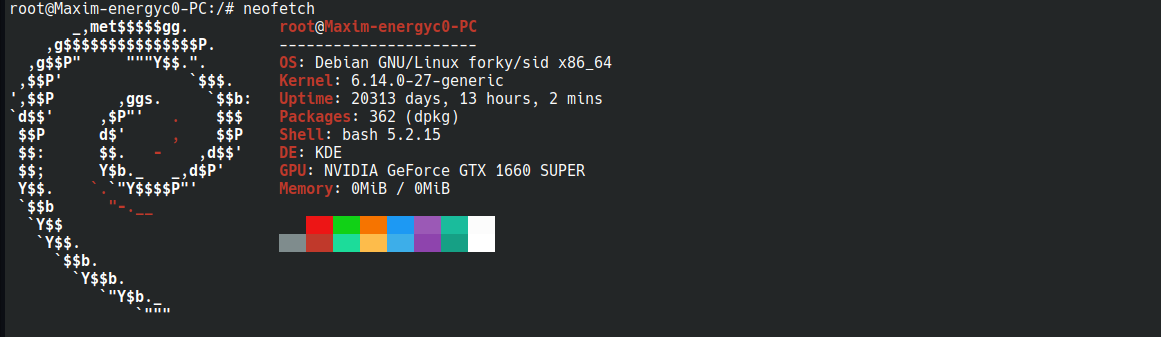
neofetch
and tadam!!!
About package managers
There are several package managers on Debian: dpkg, apt-get,apt, synaptic, aptitude and more.
- dpkg - it is a low level utility that works with .deb packages. Cannot solve dependencies and work with repositories.
- apt-get - it is a high level utility for managing packages based on dpkg. It can resolve dependencies and work with repositories.
- apt - it is a high level utility for managing packages. It is upgraded apt-get that combines apt-get, apt-cache and etc., but doesn’t have all the apt-* commands.
- synaptic and aptitude - are high level package managers with graphical interface.