Basics
When programm starts, it gets 3 file descriptors from shell (stdin/0, stdout/1, stderr/2). You may remember functions like printf() or getchar(). These are just wrapper functions around Linux syscalls. The file descriptors are connected with terminal and can be reconnected. For example,
$ cat file | sort > file_sorted
When I use ‘|’, I reconnect cat’s stdout to sort’s stdin. When I use ‘>’, I reconnect sort’s stdout to file_sorted file.
File Descriptor
File Descriptor is a non-negative integer value that is related with opened file via File Descriptor Table.
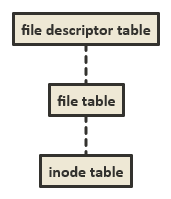
When process opens a file, kernel allocates new entry in file descriptor table connected to the file. Check the illustration below:
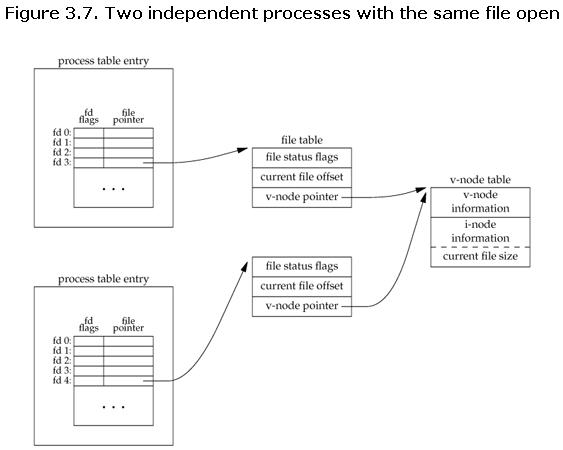
So different processes and the same process can open the same file more than once. For example, it can write to different parts of a file that file descriptors associated with.
File descriptors allocated in sequential order, meaning the lowest possible unallocated integer value.
Every process has its own limit on file descriptors (you can check it with ulimit -n).
Syscalls
To use file descriptors in your programm you will need Linux syscalls:
- open() - opens a new file descriptor.
- read() - reads bytes from file via a file descriptor.
- write() - writes bytes from file via a file descriptor.
- close() - closes a file descriptor.
- ioctl() - manipulates options of a file descriptor.
- lseek() - changes file offset of a file descriptor.
I won’t explain these syscalls in detail. More information you can find in documentation.
File holes
If you use lseek() with SEEK_END and positive offset, you create file holes. I understand file holes as reserved memory for a file. File holes don’t use disk space but they reserve space as metadata. This may be useful to create virtual disks.
For example, this program creates a file with given file hole size and writes text at the end of the file:
/*
    lseek_test.c
*/

#include <stdio.h>
#include <stdlib.h>
#include <unistd.h>
#include <fcntl.h>
#include <sys/stat.h>
#include <string.h>
#include "utils.h"

int main(int argc, char** argv) {
    if(argc < 4)
        fatal("Usage: %s [filename] [file hole size] [text]", argv[0]);

    __mode_t old_mask = umask(0);
    int fd = open(argv[1], O_TRUNC | O_CREAT | O_WRONLY, 0777);
    umask(old_mask);
    if(fd == -1)
        fatal("Failed to create a file");

    int hole_size = atoi(argv[2]);
    if(hole_size <= 0)
        fatal("Incorrect file hole size!");

    if(lseek(fd, hole_size, SEEK_END) == -1)
        fatal("lseek()");

    if(write(fd,argv[3], strlen(argv[3])) == -1)
        fatal("write()");

    if(close(fd) == -1)
        fatal("Failed to close the file");
    return 0;
}
And running it:
$ ./build/lseek_test.out file 128 hello!
$ ls -l
...
-rwxrwxrwx 1 energyc0 energyc0  134 Sep  8 17:50 file
...
IO buffers
Look at the programm:
/*
    main.c
*/
#include <stdio.h>
#include <unistd.h>

int main(int argc, char** argv){
    int c;
    char buf[BUFSIZ];
    int k = 1;
    while((c = read(STDIN_FILENO, buf, sizeof(buf))) > 0){
        printf("%d) read()\n", k);
        write(STDOUT_FILENO, buf, c);
        printf("%d) write()\n", k++);
    }
    return 0;
}
And look at the examples:
$ ./build/main.out
sdfsdf
1) read()
sdfsdf
1) write()
fads fsadfjekwlf jsdlf asd
2) read()
fads fsadfjekwlf jsdlf asd
2) write()
$ printf "abc\ndef\nghi\njkl\n" | ./build/main.out
1) read()
abc
def
ghi
jkl
1) write()
What is happening? Why are there are different count of write() and read() calls?
Kernel uses IO buffering. When a process writes to a file, it actually writes to a kernel buffer. When the file descriptor gets closed or the buffer gets filled, kernel flushes the buffer and writes data to the file.
I must say that FILE wrapper in stdio.h header has its own buffer, because calling system calls multiple times is inefficient.
Getting back to our examples, when user presses ‘Enter’, it automatically flushes stdin buffer and prints a newline character (this functionality may be turned off in configurations of your terminal).
Universal IO
When a process opens a file, reads or writes, it uses a file descriptor. But a file descriptor may be related with any type of file in Linux:
$ ./copy test test.old          # copy from file to file
$ ./copy a.txt /dev/tty         # copy from file to terminal
$ ./copy /dev/tty b.txt         # copy input from terminal to file
$ ./copy /dev/pts/16 /dev/tty   # copy input from terminal to another terminal output
This called IO versality.
Literature
Literature
I used “The Linux Programming Interface” by Michael Kerrisk to write this post.