How to check logs in Linux
There are different commands to check logs in Linux. In this topic we will look at these:
- dmesg
- journalctl
- tail
dmesg
dmesg is used to examine or control the kernel ring buffer. It is very important for kernel modules development. For example, you can use options -w or --follow for seeing messages in realtime, option -H for human-readable output and -k for seeing kernel messages.
I had entered
dmesg -kwH
and had connected my headphones via bluetooth, so I saw:
[Sep 3 09:58] input: AirPods (AVRCP) as /devices/virtual/input/input18
What is kernel ring buffer?
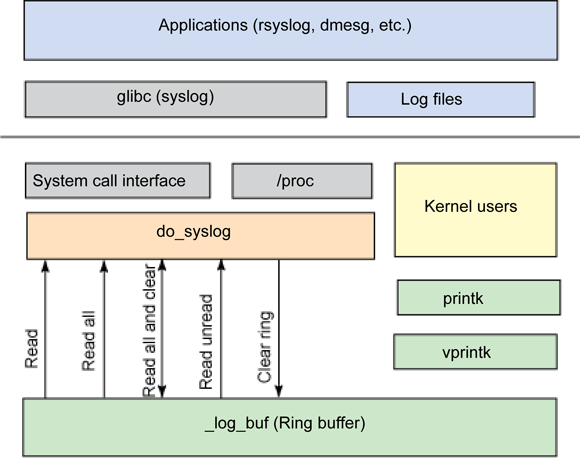
Kernel ring buffer is a buffer that holds information about important system events and can be be accessed by system administrator. It may contain logs about boot process, kernel modules being loaded or unloaded, hardware support, systemd activation, firewall events, memory, and serious issues with processes. Its location is /proc/kmsg.
Buffer size can be extracted via
grep CONFIG_LOG_BUF_SHIFT /boot/config-$(uname -r)
The number of the output value is the power of two. For example, I got 17, so my buffer size is 2^17B = 128KB.
When it is full, newer messages overwrite the oldest messages. Conceptually it can be thought of as a “circular buffer.”
Actually kernel ring buffer is in kernel space and gets messages via printk. Programms like dmesg read it using syslog() syscall - https://linux.die.net/man/2/syslog.
journalctl
journalctl is used to print the log entries stored in the journal by systemd-journald.service and systemd-journal-remote.service.
journald creates new journal at every boot. journald is a daemon. This component of systemd system initialization provides centralized logging. There is a config file /etc/systemd/journald.conf.
You can list journals by:
journalctl --list-boots
By default journalctl outputs messages from all the journals, but to reduce amount of showing journals use -b option:
journalctl -b 1
This command shows the first journal.
Use
journalctl -f
to output new messages.
Use
journalctl -e
to scroll to the newest messages.
Use
journalctl -n 5
to print the last 5 messages.
tail
tail is a command to ouput the last part of files. This command with -F option can be used to check logs. Just use
tail -F /path/to/file
It will print new messages as file grows.